A real Czech region to drive: mountain touge, city night runs and drift days. Handling between arcade and sim, tuning as deep as you want — right in your browser.
GT-Evolution is a free driving game that runs right in your browser — nothing to download, no account. You drive a real piece of Czechia: the Teplice region, rebuilt road by road from open map data and official terrain data, in the spirit of the mid-2000s street racers. The handling sits between arcade and sim, and the tuning goes as deep as you want.
The real Teplice region
50 × 44 km of real roads: the town centre and its chateau, the D8 motorway, the villages and the hairpins up into the Ore Mountains. The world streams in around you as you drive, from morning to night.
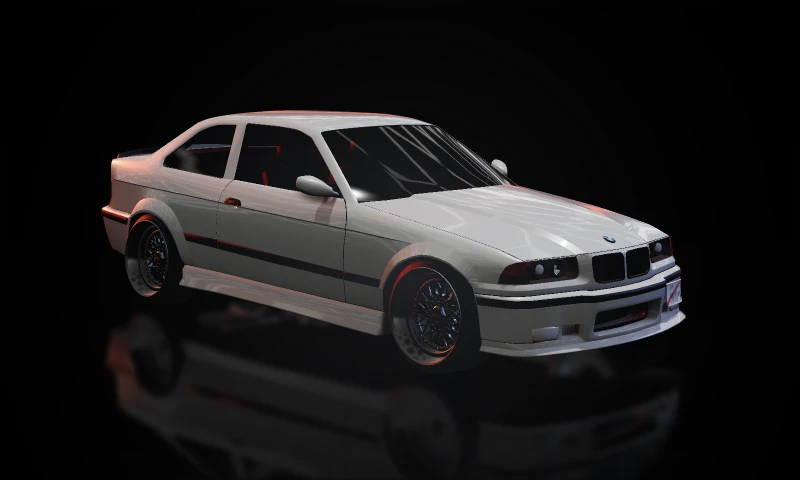
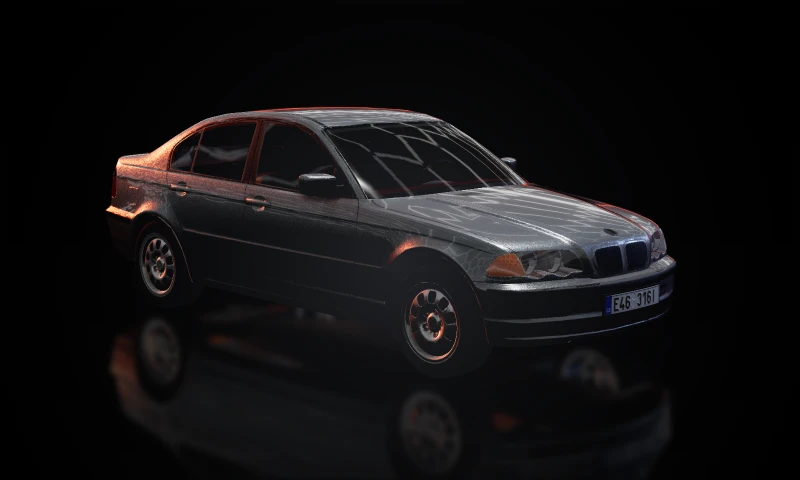
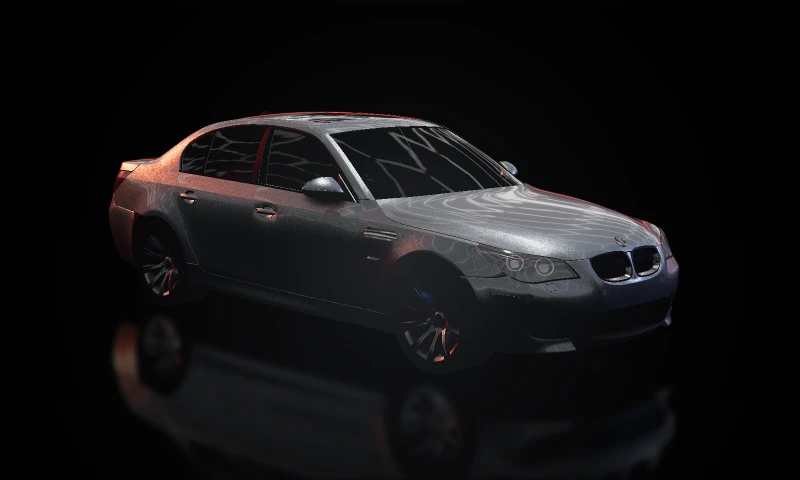
BMW E36, E46 and E60
From the 105 PS E46 316i to the twin-turbo 535d diesel and a turbocharged E36 328i. Tune the engine, turbo, gearing, suspension, tyres and assists, then pick the paint and wheels in the garage.
Online free roam
Everyone playing right now shares one map. Meet up in the mall car park at night, convoy down the D8 or chase each other up a touge. Ghost mode means nobody can ram you off the road.
Drift and photo mode
Combined-slip tyres, a limited-slip diff and optional drift assists: easy to get sideways, hard to master. Then line up the shot in photo mode.
Garage
BMW E36 Coupé1992–1999 · Coupé · M52B28 · stock 328i or the turbo buildBMW E46 Sedan1998–2005 · Sedan · from the 316i to the 330dNewBMW E60 Sedan2003–2010 · Sedan · 530d and twin-turbo 535d dieselsNew
Dev 0.8 puts everyone on the same map. Whoever is playing right now drives round Teplice with you — meets at the mall at night, convoys down the D8, a touge up the Krupka hairpins.
GT-Evolution is online. Press Play and you're on the same map as everyone else who's playing right now: the whole Teplice region, from the town centre over the D8 to the ridge roads up the Ore Mountains.
How it works
Online is the default. The first time you join you pick a name — a free Player ### is filled in for you, change it to whatever you like. The main menu's Singleplayer plays offline.
Ghost mode. In free roam cars never collide with each other — no ramming, no blocking the road, nobody wrecking your drift. A car driving through yours turns see-through for a moment; a car parked next to you stays solid, so meets and photos look right.
Everyone on the map. The minimap and the big map (M) show every player online with their name, and the counter in the corner says how many of you there are.
Find each other. Click a player on the big map to teleport to them — on a map this big that's how you meet up (for now).
Your car, your way. Others see your car the way you set it up in the garage (H): paint, wheels, lights and plate.
Your own time of day. Everyone keeps their own — drive at night while your mate has sunset.
For weaker computers
Options → Online sets how many players you see around you (10 by default, up to 40). Players further away stay on the map. If the server can't be reached, the game simply plays offline and reconnects by itself.
What's next
Online in dev 0.8 is the first step. Coming later: events and races (with collisions, opt-in), traffic everyone shares, and a career that you'll be grinding together.
Full changelog · dev 0.8 · 35 changes
NewOnline: everyone who plays now drives the same Teplice together and sees each other's cars moving around them — same models, paint, wheels and plates, with headlights, brake lights and indicators. It is on by default: pick Online or Singleplayer (offline) in the main menu, or switch it in Options → Online. If the server can't be reached the game simply plays offline and keeps trying in the background (the badge top right says Online · N, Offline or Room full)
NewGhost mode: online cars never collide with you. A car you drive through, or one that flies past right next to you, turns see-through; parked and slow cars next to you stay solid, so car meets and photos look right (photo mode always shows them solid)
NewPlayers on the maps: every online player is a blue arrow with their name on the minimap (players off its edge point from the border) and on the big map (M)
NewTeleport to a player: click their arrow on the big map → Teleport puts you right behind them — the quick way to find each other
NewPick your name the first time you join (the box suggests a free "Player ###"); names are unique among the players online and remembered. Change it in Options → Online, where you also choose how many online cars you see (10 by default — fewer is faster on weak PCs)
BetterPicking a car in the main menu goes make → model → configuration: model cards (picture, years, body, how many versions), then every engine of that model in one compact list with its power, torque, gearbox and 0–100 time, split into Petrol and Diesel with a filter on top. Arrows, Enter, Esc / Backspace (back), the pad and the mouse all work, and the menu opens on your last car's list with it selected
NewA front page: the game's address opens on a page with news about every release (screenshots you can enlarge), the cars and a big Play button. "Skip this page next time" takes you straight to the menu; /play always does, /home always shows the page, and the menu has a News link back to it
NewMap segments for testers: with the debug overlay (F3) on, the 2 km map segments get thin coloured border lines with a faint curtain in the world, the segment id big in the panel and the distance to the next border; F6 adds a finer 500 m grid. F7 pins the segment you are in as the focus: its border turns amber, the minimap and the big map outline it, a small note points the way back when you leave it, and Hold R prefers its roads. The F8 report includes the segment
NewNew car: the BMW E60 5 Series as two stock diesels — the 530d (231 PS, 500 Nm, 6-speed manual) and the twin-turbo 535d (272 PS, 560 Nm, 6-speed automatic). Huge pull from low revs, a moment of turbo lag, a soft ceiling at 4750 rpm instead of a bouncing limiter, 250 km/h limited, and the angel-eye headlights
NewNew car: the BMW E46 3 Series sedan with every engine it was sold with in Europe, each as it left the factory with its manual gearbox — from the 105 PS 316i (the base car: slow, honest, 15-inch wheels) through the 318i, 320i, 323i, 325i, 328i and 330i petrols to the 318d, 320d and 330d diesels. Each has its own plate ("E46 316I", "E46 330D"…), its own factory colour, and the car editor works on its paint, wheels, lights, indicators and windows
NewFour-cylinder engine sounds for the E46 316i / 318i (BMW petrol four) and 318d / 320d (BMW diesel four); the six-cylinder E46s use the E36 and E60 sounds, voiced for their size
NewThe E60s have their own diesel straight-six engine sound (clatter at idle, a gruff hum higher up; no blow-off valve, diesels have no throttle to blow off against)
NewTuning: a variable-geometry (VNT) turbo option and a top-speed limiter setting (ECU mods; 0 = off)
Fixed"Reset to stock" in the tuning panel resets to the car's own factory spec (it turned the Tuned E36 back into the N/A one)
NewCzech number plates front and rear: the E36 wears the personalised "E36 C0UPE" (Czech plates have no letter O), the E60s "E60 530D" / "E60 535D"; all with the EU strip, the embossed border and characters, the red STK sticker on the rear one, a bit of road grime, and a plate lamp at night
BetterNumber plates use the real Czech plate lettering, drawn from the official drawings: the open 4, the 1 with a flag and no foot, the straight-sided 0 and so on; wide letters such as "AB" or "MK" no longer run into each other
FixedAt night the rear plate no longer glows like a light box: the plate lamp is a dim warm light now
NewThe car editor (H) is now a full-screen garage: the car stands big in the middle and you turn it by dragging (wheel or pinch to zoom, Front / Side / Rear / Reset view buttons, right stick on a pad), with the sections on the left and their settings on the right. Gamepad and keyboard work like in the other menus, and props standing in the way of the camera are cut away
NewWheel colours: the centre and the lip of the BBS-style wheels separately, each in gloss, satin, matte or chrome, with presets (gold with a chrome lip, silver, gunmetal, white, bronze, all black, full chrome)
NewLight lenses: headlights clear, yellow, blue or smoked with a chrome or black housing; tail lights red, clear or smoked — smoked tail lights still clearly light up when you brake. Preview the lamps and brake lights right in the editor
NewFront indicators in orange, white (clear) or black (smoked), with a "tint toward black" slider; they still blink amber (hazard-light preview in the editor)
BetterEvery section of the car editor has its own Reset to stock; your existing paint and window tint carry over
BetterHold R in two steps: half a second puts a car on its roof or side back on its wheels right where it is; keep holding and it goes to the nearest road (right-hand lane, facing the way you were driving) instead of all the way back to the start. Parkside still goes back to the pit
NewAuto resolution (Options → Graphics → Resolution, the new default): when the graphics card can't hold 60 fps (or your frame-rate cap), the 3D view drops its resolution in small steps — down to half — and climbs back when there is room; if even that isn't enough it offers a lighter preset. Fixed 100 / 75 / 60 / 50 % are still there. High-DPI screens render at most 1.5× (phones 1.25×), and F3 / F9 show the current scale
FixedDistant trees and buildings no longer turn into white blobs and a white smear at the edge of the view (from high up in the free cam / photo mode, looking at the hills): everything far away now fades into the same haze as the hills behind it
FixedParking-bay lines and other painted markings on car parks lie flat on the asphalt again: they floated up to 14 cm above it, cast their own shadows and the wheels sank into them
FixedOC PimpYa car park, the outlet side: the bay lines now run all the way to the end of the rows (the made-up planted islands at the outlet-side row ends are gone, it is plain asphalt there like in reality) and no longer disappear when you look from further away, the dark band and the pale patches from the old building-site photo are gone (the whole car park is one asphalt), a stray row of bays that cut across two rows has been removed, and the driving lanes between the rows run straight to the end instead of stopping halfway and cutting across the bays
NewCruise mode (key 4, d-pad up on a pad): drive round Teplice calmly and by the rules, like Mafia's speed limiter. The car can't go faster than the speed limit of the road it is on (50 in town, 90 outside, from the real road data; the limit shows as a small sign on the dashboard next to a green cruise lamp), pulls away gently, the automatic shifts early at low revs like a real car, and the indicators blink by themselves when you turn off at a junction (and cancel after the turn, tick-tock included)
FixedPulling away gently (a light, steady squeeze of the gamepad trigger) no longer stalls the engine in 1st: the car now rolls off smoothly on every car, while a too-tall gear still stalls like it should
NewA GT-Evolution mouse cursor: a sharp light arrow with an orange edge, all orange over anything you can click. While you drive it gets out of the way — hidden at once, back when you move the mouse, gone again after a moment of rest; in menus it stays a few seconds longer, and never disappears while you hold a button
NewP pauses the game without the menu: everything freezes in place (the car, the smoke, the crowd, the inflatable dancers), the HUD gets out of the way and a small "Paused" note fades after two seconds, so the frame is clean for a picture. Shift+C flies the free camera through the frozen world, P again carries on
NewPhoto mode: the free camera (Shift+C) has a new panel to set up the shot: field of view, camera roll, fly speed, time of day, exposure, bloom, vignette, film grain, motion blur and depth of field (with "Focus on car"); Reset puts it all back, and leaving the free camera returns the game to normal. V hides the panel
FixedPhoto mode's motion blur slider now really blurs, like a panning shot: the camera follows the car, the road and the scenery streak past behind it (near things more than far hills), the car stays sharp and its wheels spin into a blur. It works on a frozen frame (P) and ends up in the K screenshot; 100 % is about a 1/15 s exposure
NewScreenshots: K (or Capture in photo mode) saves the picture as a PNG at full resolution with no HUD or menus on it, just the GT-Evolution logo in the corner
FixedA car thrown hard into the air (like under the I/8 bridge west of the Teplice centre) could spin itself into a broken state and freeze on the spot for good; it now stays in one piece, and if the physics ever goes wrong the car is put back on its wheels where it was
Everything besides online that came with dev 0.8 — new cars, a garage, photo mode and Cruise.
Online is the big one in dev 0.8 (see the post above), but there's plenty more.
New cars and a garage
BMW E46 sedan with every engine it was sold with in Europe, each as it left the factory with its manual gearbox: from the honest, slow 316i (105 PS, 15-inch wheels) through the petrol sixes to the 318d, 320d and 330d diesels. The fours have their own engine sounds, and every version gets its own plate and factory colour.
BMW E60 as two stock diesels: the 530d (231 PS, 500 Nm, manual) and the twin-turbo 535d (272 PS, 560 Nm, automatic). Massive low-end pull, a moment of turbo lag and their own straight-six diesel sound.
A new car picker in the main menu, in three steps: make → model → version, with power, torque, gearbox and 0–100 time for each one.
The garage (H) goes full screen: the car stands in the middle and you spin it with the mouse, a pad or a finger. Wheel colours for the centre and the lip, tinted lights, smoked indicators, and a reset to stock in every section.
Czech number plates front and rear, lettered after the official decree drawings — the open 4, the 1 with a flag. "E36 C0UPE", because Czech plates have no letter O.
Photo mode
P pauses without a menu: everything freezes and the HUD steps aside. Shift+C flies through the frozen world with a panel to set up the shot — field of view, roll, exposure, bloom, vignette, grain, depth of field.
Motion blur like a panning shot: the car sharp, the background streaking, the wheels spinning.
K saves a full-resolution screenshot with no UI, just the logo in the corner.
Cruise
Key 4: drive round Teplice calmly and by the rules. The car won't go faster than the road allows (the sign is on the dashboard), pulls away gently, the automatic shifts early and the indicators come on by themselves when you turn off.
And more
Hold R in two steps: half a second puts the car back on its wheels, two seconds take it to the nearest road.
A custom cursor that hides while you drive.
Auto resolution that holds 60 fps on weaker graphics too.
Fixes: distant trees and houses no longer bleach out in the haze, the OC PimpYa car park has its bay lines all the way to the row ends, and map segments for testers (F3 / F7).
This page with the news, now in English and Czech.
A big map must not stutter. Dev 0.7 is all about performance — fewer hitches as towns stream in, a faster start, a lighter menu and a new profiler that shows exactly what every frame cost.
The big map was followed by a big clean-up. When you hit a town at 150 km/h, the game has to build the streets, houses and signs before you get there — without a single hiccup. So for dev 0.7 we chopped all that work into small pieces and measured every millisecond.
Fewer hitches: kerbs, road markings, buildings and textures are built in small batches and off the main thread. On the Teplice test drive the longest piece of streaming work dropped from 25 to 11 ms.
Streaming ahead: the tiles you're driving towards are ready before you arrive.
Half-size terrain downloads and a faster start: sounds load alongside the map, and the menu already fetches the start of Teplice while you pick.
Frame-rate cap in the options (30 / 60 / 120 / 144 / display rate / unlimited) with even frame times.
Lighter menu and minimap: the map preview in the menu is one 2 MB file instead of 500, and the minimap no longer eats frames in towns.
Lighter frames in towns: whole city blocks outside the view are skipped at once, and High shadows cost the graphics card about half as much.
Profiler (F9) and trace (F10): a frame-time graph split by system, a list of hitches with what the game was doing at the time, and an export of the last 30 seconds to Perfetto.
Full changelog · dev 0.7 · 15 changes
NewProfiler (F9): a frame-time graph split by system, the GPU, a list of hitches with what the game was doing in each, the slowest work of the last bad frame, counters and recent errors
NewF10 saves the last 30 seconds as a trace you can open in Perfetto (ui.perfetto.dev): every system, tile build step, shader compile, download and worker job on one timeline
BetterCrash and error reports now include what happened just before and where you were, so bugs can be found and fixed faster (anonymous; turn off with ?report=0)
FixedFar fewer stutters when map tiles stream in at speed: road kerbs and markings no longer build in one big lump (a single 0.6 s freeze in the Teplice centre), textures upload a slice at a time, and the load cache saves in the background
BetterThe minimap turns and slides smoothly every frame and no longer eats the frame rate in towns: it is drawn now and then in small pieces and moved by the graphics card in between (it cost 10–20 ms a frame at speed in Teplice on some setups)
BetterStreaming looks ahead: the tiles you are driving towards are ready before you get there, the nearest work goes first, and the build work adapts to how busy each frame already is (more while you stand or sit in the menu)
BetterSmoother still when towns stream in: map files are read and checked in the background, shop signs, billboards and road signs are painted off the main thread and sent to the graphics card in slices, and the biggest building, landmark and kerb jobs are cut into small pieces (on the Teplice test drive the longest piece of streaming work went from 25 to 11 ms, and ten times fewer pieces take over 8 ms)
BetterTerrain downloads are about half the size (packed heights, unpacked in the background)
BetterPhones and tablets: lighter ground textures (within the 1024 px budget) with fewer mip levels, uploaded in smaller pieces
BetterLighter menu and loading screens: the blurred backgrounds come pre-blurred instead of being blurred again every frame
BetterFaster start: sounds load alongside the map instead of after it, and while you pick in the menu the game already fetches the start area of Teplice in the background
BetterThe main menu opens light: the Teplice map view on its card loads only when you point at it, from one 2 MB file instead of about 500 map files (50 MB) — the big map (M) opens from the same file
NewFrame rate option (Options → Graphics): 30, 60, 120, 144, your display's rate or unlimited, with even frame times — a cap skips whole screen refreshes instead of guessing with a timer, and 60 on a 165 Hz screen runs at an even 55. The time left under the cap builds the map around you. Phones start at 60
BetterLighter frames in towns: whole blocks of the city outside the view (and outside each shadow map) are skipped at once instead of being checked object by object — about a quarter less culling work for the view and three quarters less for the shadows
BetterShadows (High) cost about half as much on the graphics card: the distant shadow map is reused for a few frames instead of being redrawn every other frame, and redrawn at once when you turn
The car park near Srbice grew into a 50 × 44 km region. Teplice, the Ore Mountains, Duchcov, Osek, Bílina and the D8 motorway — one seamless map that streams in around the car in 2 km tiles.
The biggest update GT-Evolution has had so far. The map is no longer one car park with some surroundings — it's the whole Teplice region: real terrain, aerial imagery, roads from OpenStreetMap, and houses, churches and chimneys exactly where they stand in reality. The world streams in around the car in 2 km tiles, so you can drive anywhere without another loading screen.
Teplice: the old town with Zámecké náměstí, the chateau and the plague column, the Trnovany tower blocks, the station, Šanov, Řetenice, Prosetice. Pavements, street lamps, traffic lights, shop windows, and the I/8 + I/13 bypass as a fast dual carriageway.
The Ore Mountains: a touge from Bohosudov through Krupka up six hairpins to Komáří vížka, the fast I/8 climb from Dubí to Cínovec, the switchbacks up to Bouřňák and the climb from Osek to Dlouhá Louka. Guardrails, marker posts, "12 %" signs and retaining walls.
West, south and east: Duchcov with its chateau, Osek with its monastery, the Bílina valley, the fast I/63, the D8 motorway with the Úžín exit, Chabařovice, Chlumec and Lake Milada.
Real bridges, over and under — the bypass, the I/63 viaducts, the D8 at Úžín and dozens more, each one modelled from photos.
Start at: pick where to begin in the menu — Zámecké náměstí, Komáří vížka, Cínovec, Duchcov, Milada and more.
Big map (M), photo mode in the free cam and a debug overlay (F3) for testers.
Full changelog · dev 0.6 · 64 changes
BetterFaster loading in Teplice: building collisions come pre-baked with the map, road markings and kerbs from the load cache, map images decode in the background, and you start driving while the neighbouring districts finish streaming in
BetterMuch less memory: about 1 GB less RAM in the Teplice centre (map geometry and textures live only on the graphics card once uploaded, roads use a leaner vertex format)
FixedFewer hitches when new map tiles appear: their shaders are compiled before they show, and stay compiled when tiles unload
FixedLong drives no longer slow down until the game freezes: tiles you leave behind give their full detail back instead of keeping it for good, street lamps and the minimap no longer rebuild everything whenever a tile streams in, and a tile unloading no longer recompiles the road shader (a hitch at every tile border)
BetterNo more second-long hitch when driving into a town for the first time after an update: shop-sign and prop atlases are saved to the cache in the background
BetterFaster rendering: ambient occlusion no longer draws the whole scene a second time, the post effects run in about half the full-screen passes, the sky is shaded only where you can see it, and lights that are off (daytime headlights, brake glow) cost nothing
BetterMobile preset: a lean post chain without the high-precision buffers and a single headlight beam — smoother on phones; shadows drop to Low on GPUs with few texture units
BetterSmoother car and camera motion on high-refresh screens (the car is drawn between physics steps), about half the physics CPU time, less per-frame garbage, and the pause menu no longer redraws the whole scene every frame
NewDebug overlay (F3) shows a performance block: CPU time per system, GPU time per render pass, draw calls, triangles and memory
FixedStreet-lamp insects no longer pile up as tiles stream in and out (memory and draw cost crept up over a long drive)
FixedBig map no longer stutters when you zoom out over the whole region: zoomed out it draws a cached image of the map instead of every road and building
BetterNew loading screens: Teplice and the chateau at sunset, Bohosudov, burnouts and drifts at OC PimpYa and Parkside, the D8 through the woods
BetterDistant buildings are drawn as simple blocks and swap to full detail as you approach; roads and street furniture past the draw distance are skipped entirely — lighter frames in the Teplice centre, most on Potato / short draw distance
NewDebug overlay (F3, or Debug overlay in the pause menu): road, junction and landmark ids over the world, where you are (tile, S-JTSK, GPS) and the nearest road; F8 copies a one-line report for bug reports
NewBig map (M, or Map in the pause menu): the whole map full screen — pan, zoom, road names, start locations; the gearbox toggle moved to B
FixedThe game runs on phones again (headlight pattern and sign textures were too much for mobile GPUs)
FixedCar no longer turns black with baked / realtime reflections on some graphics drivers
NewReal horizon: the Krušné hory ridge, Bořeň and the whole Teplice basin now stand around Srbice (terrain + aerial photos, 50 × 44 km)
NewTeplice region map: the world now streams in 2 km tiles round the car; Srbice and OC PimpYa are its first location
BetterDrive past the old Srbice edge: fields, woods and hills of the neighbouring tiles all round
NewKrupka touge: Bohosudov → Krupka → the six hairpins up to Komáří vížka (+517 m), on to Fojtovice and west to Cínovec
NewMountain roadside: guard rails, reflector posts, bend / serpentine / 12 % signs, bus stops and retaining walls
NewLandmarks: the Komáří vížka chairlift with moving chairs, the lookout tower, Krupka castle, the Bohosudov basilica, wind turbines
NewStart at: pick where to begin in Teplice — Srbice, Krupka, Horní Krupka, Komáří vížka, Fojtovice or Cínovec
BetterTiles stream in while you drive without hitches (detail builds sliced into small steps)
FixedHill starts on 11–15 %: 1st gear no longer lugs into a stall and rolls you back down
NewThe east: drive out of Srbice on the I/13 to Soběchleby, Přestanov, Chabařovice and Chlumec, Modlany and Věšťany to the south, and the industrial zones on the way
NewD8 motorway: 6 km of two-lane carriageways with the exit 74 Úžín ramps onto the I/30, lane markings and the median rail
NewLandmarks in the east: the churches of Chlumec, Chabařovice and Modlany, the Horka chapel, the 1813 battle monuments and the big chimneys
NewStart at: Chabařovice and Chlumec
NewPhoto mode: in the free cam (Shift+C) the world loads round the camera, and a panel loads everything in view up to the whole region for big screenshots
NewDubí → Cínovec: the I/8 from the Teplice edge through Dubí and 8 km of fast forest climb (+500 m, climbing lane, the H1 hairpin) up to the border at Cínovec
NewThe big loop: Srbice → Krupka → Komáří vížka → Cínovec → down the I/8 → Dubí → II/253 back to Krupka
NewDubí, Mstišov, Pozorka, Bystřice and Přítkov with their streets and houses; Cínovec gets its petrol stations and border shops
NewStart at: Dubí and I/8 — climb
NewWest ridge touges: the Bouřňák serpentine from Hrob up to Mikulov, the hairpin climb from Osek to Dlouhá Louka, and the ridge roads on to Nové Město, Moldava and back east to Cínovec
NewMikulov, Nové Město, Moldava and Dlouhá Louka with their houses, churches and chapels; the Bouřňák ski area drag lifts with moving T-bars
NewThe state border is walled off: no more driving into Germany
NewStart at: Dlouhá Louka, Osek — Dlouhá Louka climb, Mikulov, II/382 — Bouřňák climb, Nové Město and Moldava
NewTeplice city: the centre with Zámecké náměstí, the chateau, the churches and the Holy Trinity column, Trnovany and its blocks of flats, the station, Šanov, Řetenice and Prosetice
NewCity streets: sidewalks on both sides, lamp posts, traffic lights, bus stops, shopfronts on the main streets and old tenement houses in the centre
NewThe Teplice bypass (I/8 + I/13): a fast dual carriageway past the city, joined to the I/8 from Dubí and the I/13 from Srbice
NewStart at: Teplice — Zámecké náměstí and Teplice — hlavní nádraží
NewRound Teplice: Novosedlice and Proboštov, Újezdeček and Hudcov, Nová Ves on its hill and the fields to Světice, with the glassworks and heating-plant chimneys
NewThe west: Duchcov, the second real town — the chateau round its cour d’honneur, the square with the Holy Trinity column and the Annunciation church
NewOsek with the Cistercian monastery, Hrob, Košťany, Lahošť, Jeníkov and the mining-lake country between them, all on the I/27, II/254 and II/258
NewThe I/27 now runs all the way from Dubí through Košťany and Hrob to Osek: the Bouřňák serpentine starts at its real foot in Hrob, the Dlouhá Louka climb at the Osek crossroads
NewThe south: the Bílina valley from Bystřany and Kozlíky to Rtyně nad Bílinou, Žalany and Bořislav, and the Hostomice side with Zabrušany and Křemýž — every paved road, villages with their houses, lamps, bus stops and town signs
NewI/63 motorroad: 11 km of dual carriageway at 130 km/h from Bystřany past the Malhostice exit, plus the I/13 dual carriageway at Hostomice — lane markings and median rails
NewLong fast country roads in the south: the I/8 over the Bílina and up the Velvěty climb, II/258 through Rtyně and Žalany
NewLandmarks in the south: the churches of Rtyně, Bořislav, Zabrušany, Křemýž, Hradiště, Brozánky and Bystřany, village chapels, monuments and the factory chimneys
NewStart at: Hostomice and I/63 — Malhostice straight
NewVarvažov: the I/13 and the D8 run on east from Chlumec past the 1813 Prussian and Austrian battle monuments to the edge of the map
NewŘehlovice: the I/63 now runs on over its viaducts to the D8 interchange, and II/258 through Řehlovice and Stadice with the Přemysl Oráč monument
NewLake Milada: the whole lake on the map, and a road down to its car park from Chabařovice
NewOff-road links: the closed old roads come back drivable — the I/8’s abandoned forest alignments above Dubí, the Sedmihurská cesta, III/01318 to the border at Moldava, the Nové Město wind-farm road, the Osek monastery drives, Střelná, Jeníkov and Lahošť lanes
NewThey look and feel closed: broken asphalt with gravel patches and potholes, no lines, less grip, a “no entry” sign at each end, dashed on the map
BetterTeplice pedestrian zone: rows of dark steel bollards close every entry from the streets (Lázeňská, Krupská, Zámecké náměstí, Těšínská cesta …)
BetterCínovec: the German streets of Zinnwald behind the border wall are gone, every road ends at the border with a guard rail
NewReal bridges: drive over them and under them — the I/30 over the D8 at Úžín, the Teplice bypass viaducts, the I/63 at Bystřany, the Kozlíky viaduct, the I/27 bridges in Hrob and dozens more
BetterRoads that used to dead-end under a bridge run through again: Na hrázi, Alejní, Bystřanská and Hřbitovní under the Teplice bypass, the I/8 at Bystřany, U šmelce in Chlumec, the streets of Hrob and Střelná
NewEvery bridge rebuilt from photos: its deck, piers, abutments, railings, noise walls and colours; railway bridges over the roads too (trains come later)